The final artefact looked into redeployed websites onto an Android and iPhone device and whether they enhance/hinder their experience. The answers consisted of the following sections to outline their experiences; presentation, navigation, accessibility, content, clarity and speed.
The design and structure were built upon from artefact 5, where I tested the app for potential errors and faults. The app was built using Flash CS5.5. This incorporated actionscript 3 and consisted of new elements added in from the previous feedback. The application was published using Air for Android and Iphone with 2.6 supports in Flash CS5.5. I recorded myself using the application for analytical testing. I didn’t have time to record respondents within the timeframe provided. I could have improved this by organising a focus group to gather results. Other changes would have been within the application build, which would have best suited JavaScript and HTML5 use the Eclipse SDK.
The experiment was set up to find out whether the application built has had an effect upon redeploying a website onto a hand-held device. Participants were provided with a survey (SurveyMonkey) that consisted of additional instructions. The number of participants resulted in fifty three and results were compiled into a stacked bar chart. The results highlighted that the majority of respondents did, in fact, have an enhanced experience with using the application.
Overall, the application experiences have proven quite effective from using the extensive research from previous arefacts. The research document provided a useful insight into building this application. I did not have enough time to complete the application due to time constraints. The results of the survey contribute to my research which argues that redeployed websites do enhance user experience of a website is various ways.

Showing posts with label PRP. Show all posts
Showing posts with label PRP. Show all posts
Thursday, 12 May 2011

Wednesday, 11 May 2011
Artefact 6 - Results
The final artefact looked into redeployed websites onto an Android and iPhone device and whether they enhance/hinder their experience. The answers consisted of the following sections to outline their experiences; presentation, navigation, accessibility, content, clarity and speed. The sections were accompanied by a five sectioned rating system using; very poor, poor, average, good and very good.
The design and structure were built upon from artefact 5, where I tested the app for potential errors and faults. The app was built using Flash CS5.5. This incorporated actionscript 3 and consisted of new elements added in from the previous feedback.
Here is the results from SurveyMonkey...

Overall, the application experiences have proven quite effective from extensive research. The research document provided a useful insight into building this application. The results of the survey proven that redeployed websites do enhance user experience of a website, providing various enhanced experiences in relation to the desktop website.
Here are the results in figures...


Here are the results complied into a stacked bar chart...


Saturday, 7 May 2011
Artefact 6 - Survey
Before i summarise my final artefact i have created a survey to contribute to my research question and artefact. My artefacts have been directing off course since artefact 4 due to the lack of skills and resources available to venture into 'voice controlled applications'. The reason to have a survey is to touch upon the usability of my artefact as it directly relates to my research question. The survey information is listed below...
My survey questions...
1. Rate the following elements based on the website application
2. Does the application format of the website enhance your experience based on the elements featured below?
My survey questions...
1. Rate the following elements based on the website application
2. Does the application format of the website enhance your experience based on the elements featured below?

Survey link - http://www.surveymonkey.com/s/Z89KDKG
Friday, 6 May 2011
Artefact 6 - Publishing Apps
To gain an understanding of application publishing further i have compiled a list of resources to find the best method in approaching publishing Android Air Apps (.apk) and Iphone Apps (.ipa).
1. A video showing how to develop apps with Andorid with Flash CS5
2. Creating an app using Basic4Android which uses Visual basic language with Android features.
http://www.basic4ppc.com/index.html
3. Creating an app using Eclipse and Android SDK (Javascript).
4. Use Google App Inventor to create a fast app but with limited options
Artefact 6 - Plan
To test my artefact i need to test the app against the website and provide participants a set of question touching upon the enhancing/hindering factors. Once the participants have finished the task and filled out the survey i will have statictics of wether redeployed apps/websites enchance users experience on hand-held devices?
I have no got to finish the app and deploy it to hand-held devices and make some final tests and corrections. To gain an understanding of what questions and tasks they can perform, i will research into surbeys and collectivley produce material for the testing stages.
I have no got to finish the app and deploy it to hand-held devices and make some final tests and corrections. To gain an understanding of what questions and tasks they can perform, i will research into surbeys and collectivley produce material for the testing stages.
Wednesday, 4 May 2011
Artefact 6 - Idea
For my final artefact i am going to build upon the app prototype from artefact 5. I received feedback which was useful for correcting content and adding additional features to the app. The point of the final artefact is that from research, the main contributing factors of enhanced experience on hand-held devices was the apps design, navigation and speed.
This artefact is going to be a finished product where i can show participants how an app can be designed effectively to bring structure and familiarity. The final artefact will be published from Flash Builder and consists of actionscript 3. The app run from Air 2.5 which is an additional feature in Iphone and Android 2.2 +
This artefact is going to be a finished product where i can show participants how an app can be designed effectively to bring structure and familiarity. The final artefact will be published from Flash Builder and consists of actionscript 3. The app run from Air 2.5 which is an additional feature in Iphone and Android 2.2 +
Monday, 2 May 2011
Artefact 5 - Evaluation
My fifth artefact looked into the effect of the scrollable type navigation on an app for a hand-held device; which was identified in artefact 3. This artefact looked into testing this type of navigation within an app on a hand-held device.
The design and structure was taken forward from artefact 3 where i added additional content to form a complete design. The app was built using Flash Builder along with actionscript 3; which consists of six pages reflecting the content provided from the we7 website.
The app was tested on an android mobile (HTC Desire) and an emulator (Android SDK). I recorded me using the app so I could further analyse for rectifying errors later. From initially testing the app I found several issues with the usability of the finished product. These were the following; there was not enough surface area to push the buttons on; this could have been solved with adding a ‘hit’ area within Flash. Some of the other issues included; slow loading time and missing stop frames on certain pages. The main element was the music player which was created as means of playing music from we7, which would sync with your playlist. Due to the timeframe and skills within app creation, I was only able to produce part of the music player.
The artefact was followed up with a focus group consisting of four people; this aided in outlining several key issues regarding the app’s usability. Main points identified were that the app needed an ‘introduction page’; which would have helped with informing users about certain elements of the app e.g. how to use it. From the results identified, I can progress on with editing the app and producing the final artefact where I will be testing against the we7 website.
Thursday, 28 April 2011
Artefact 5 - Music
The whole point of my app is to test the 'navigation' results from arefact 3. This will be tested but i need some content and music examples to engage with upon testing. So i have looked into adding in a mp3 player which will sit within the app and can play local/cashed music from the original website. This feature if i could build it would let users link online via Wi-fi and would be able to sync music with this app. This would provide and extra feature which would enhance the users experience.

So far i have managed to include some script which links a local .mp3 file which plays upon pressing the 'play' button within the app (screenshot below).
Wednesday, 27 April 2011
Artefact 5 - Progress
After researching endlessly on crating apps for my 5th artefact i stumbled across building my app within Flash Builder. This would provide me the best viable chance of producing a working app which i could publish on an Android phone. This is crucial to gathering results as it will need a touch screen interface.
So far i have delved into building the app and heres my progress so far...


So far i have delved into building the app and heres my progress so far...


What Ive got left to do...
- Finish the apps interface
- Add in some content
- Publish the app
- Test the app and evaluate
Wednesday, 6 April 2011
Artefact 5 - Idea
From my previous arefact where i looked further into the navigation as being a crucial aspect in using app/websites on devices which can affect the user experience. This lead me onto looking into incorporating speech recognition as an additional test to add to my prototype which could be tested as well as the navigation when i create an app.
My next artefact is going to take a step back and hopefully build a working app of the we7.com website. This artefact will hopefully be deployed onto several hand-held devices for testing purposes. The results of this will be carried forward to build upon this for a final summary and to hopefully answer my question. 'Does redeployment of a website onto a hand-held devices enhance the users experience?.
The Task...
What I'm going to build? - I'm going to make an app using Flash builder and incorporating all of the content from artefact 3.
Why am i doing this? - To show a website in an app form which hopefully will be a prototype which shows how apps can enhance the website version.
Where I'm going to test? - I'm going to deploy the app onto varied hand-held devices and test through survey/questionnaire in focus groups. To get started I'm going to delve into the world of apps via looking into Adbobe Builder and Air. Ive found some useful tips on there website at adobe.com
Apps - Experimenting
To begin with understanding how apps work, i looked at Googles App Inventor. App Inventor is a part of Google Labs, a playground for Google Engineers and adventurous Google users.
You can build many different types of apps with App Inventor. Often people begin by building games like MoleMash or games that let you draw funny pictures on your friend's faces. You can even make use of the phone's sensors to move a ball through a maze based on tilting the phone.
But app building is not limited to simple games. You can also build apps that inform and educate. You can create a quiz app to help you and your classmates study for a test. With Android's text-to-speech capabilities, you can even have the phone ask the questions aloud. To use App Inventor, you do not need to be a professional developer. This is because instead of writing code, you visually design the way the app looks and use blocks to specify the app's behavior.
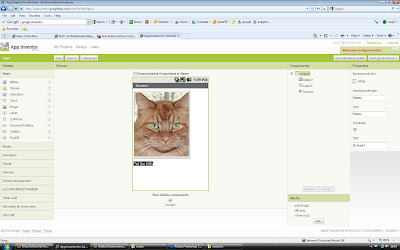
I have attempted the 'cat' tutorial to understand what is involved in the creation/distribution of Android Apps. Below is a screenshot of me using App inventor.
You can build many different types of apps with App Inventor. Often people begin by building games like MoleMash or games that let you draw funny pictures on your friend's faces. You can even make use of the phone's sensors to move a ball through a maze based on tilting the phone.
But app building is not limited to simple games. You can also build apps that inform and educate. You can create a quiz app to help you and your classmates study for a test. With Android's text-to-speech capabilities, you can even have the phone ask the questions aloud. To use App Inventor, you do not need to be a professional developer. This is because instead of writing code, you visually design the way the app looks and use blocks to specify the app's behavior.
I have attempted the 'cat' tutorial to understand what is involved in the creation/distribution of Android Apps. Below is a screenshot of me using App inventor.

Wednesday, 23 March 2011
Artefact 4: Evaluation
My fourth artefact looked deeper into navigation and the effect of voice control. Speech recognition provides an additional element which can help aid accessibility. My original route involved testing the navigation on users by creating a prototype; instead I have created voice controlled navigation as a prototype.
The structure for naming the links came from using the name of the navigation link in the speech recognition box; this provided an easy method for testing the links later on.
As I have limited skills within Android application SDK, I constructed the application using just HTML5, CSS3 and JavaScript. The speech API worked using Flash to control the microphone and to capture the voice sound. This was passed through JavaScript into the website, providing commands to certain HTML tags (e.g. ) creating an effective way to match the speed to that of a normal application.
I hosted the website on a local server to allow for greater speed upon testing. The website was tested through a browser (Firefox) which ran from a server (Wamp). I planned out several actions to perform e.g. testing links, which I planned using certain ‘words’ specified in the code that would be used to navigate around the website. This resulted in making several videos which was recorded using CamStudio.
The results from analysing the video concluded that sometimes links had to be repeated twice for the navigating to work. Other problems were that the scroll feature didn’t work and zooming in didn’t increase content size e.g. text size. Overall, the navigation experience of using voice was successful upon navigating. But I’m not going to continue to use speech recognition in my artefact as an additional element in the navigation. This is due to the lack of data currently out there in supporting the development of my application.
Tuesday, 22 March 2011
Artefact 4: Analysing
To analyse my artefact i recorded myself using the speechapi by talking to the browser to make the pages navigate as it would do on a hand-held device. Below is the videos of me doing this...
Video 1: Navigation
This video I'm talking to the browser to make it navigate across using tags within the HTML code (scrollable navigation from previous artefact).
Video 2: Paragraph
This video is extending upon using speechapi to read out paragraph number back to the end-user using an automated voice.
Video 3: Scroll
This video uses the extra features in javascript to help users scroll up and down using voice only.
Video 4: Example
This video is a mix off all the above features using navigation mixed with paragraph readings.
Monday, 21 March 2011
Artefact 4: Idea
For my 4th artefact I'm going to use Speechapi as the basis for creating the links. My artefact is supposed to be based upon creating an android app but as i have only 2 weeks to create this I had to find an alternative way. My idea is to simulate the website app as it would appear on a mobile phone. This can be done through an Android SDK which will run on Windows Vista. The reason why i can use a PC is due to the fact that i can talk through the PCs microphone (instead of a phone) and use the mouse in replacement for touchscreen.
To analyse this i will be recording me using the website through screen capture software (CamStudio). This is capable of recording my voice to show me navigating through various links. The speechapi also offers additional features (e.g. speech-to-text) which i will be also testing alongside the navigation.
To analyse this i will be recording me using the website through screen capture software (CamStudio). This is capable of recording my voice to show me navigating through various links. The speechapi also offers additional features (e.g. speech-to-text) which i will be also testing alongside the navigation.
Sunday, 20 March 2011
Artefact 4: Research 2
Upon looking into speech controlled links i fount a website called (http://www.becauseclickingisso90s.com). This website is controlled not only via voice, it uses a webcam as a way for users to use movements e.g. hands to navigate around. This video gave me more inspiration to use the links within my artefact.
Here is a video showing Andreas Lutz website 'Because clicking is so 90s!'
ANDREAS LUTZ - Because clicking is so 90s! from Andreas Lutz on Vimeo.
Artefact 4: Research
One of the resources i have found is at (www.speechapi.com).
They use a combination of;
# PHP
# Python
# Ruby
# HTTP API
# Command Line Inteface (using Java Libraries)
They use a combination of;
- Speech API server
- Use an array of coding languages for Speechapi; # Javascript
# PHP
# Python
# Ruby
# HTTP API
# Command Line Inteface (using Java Libraries)
- Use HTTP Protocols
- Provide Flash, Javascript and applet api's for browser side recognition
The javascript API has three modes. Basic, Advanced and Automatic. Basic mode is the best way to get started. It provides a simple set of methods and callbacks that you can use in your web pages. Advanced mode integrates nicely with modern javascript tool kits like jquery. In advanced mode you design the grammar segments that will create events, and you write the javascript callbacks that will process those events. Automatic mode allows you to add basic speech processing to your web page with minimal amount of code. You indicate which html tags you want to speech enabled and add some grammar hints to those tags.
The speechapi can be monitored using a 'developer ID' which will record all commands that run through the website.
The speechapi can be monitored using a 'developer ID' which will record all commands that run through the website.
Friday, 18 March 2011
Artefact 4: Plan
My last artefact was the effects design had upon various navigational menus on hand-held devices. The results concurred that the 'Scrollable' (across) navigation was the popular choice for end-users. This however was surprising and before testing this i want to bring in some of my research document via exploring accessibility. My research prior to this shown that there is a huge gap between disabilities not being able to use websites/apps. My idea is to bring 'speech recognition' to the navigation through voice controlled links.
Thursday, 3 March 2011
Artefact 3: Evaluation
Artefact 3: Evaluation
My third artefact looked at the effects that design can have on hand-held device application navigational experience. This was followed from the last artefact where ‘navigation’ was identified as one of the main contributing factors in browsing around a redeployed website. The last artefact was steering away from my objective and resulted in focusing back on this with the next artefact.
The creation of the application interfaces began with constructing several wireframes, based upon different navigation positions and types. Three designs were designed in Illustrator in order to correlate with the survey questions. The questions was based upon navigation content and touched upon how users of applications navigated around, providing them with selective answers to each question. In order to help understand the questions, several illustrations were created to sit alongside these answers; this provided a great visual representation for a greater response.
The survey was created and distributed thorough Instantsurvey; an online survey manager. This provided a quick and productive way of collecting responses, which resulted in collecting fifty two responses. Analysing the survey resulted in the following summaries; 'scrollable navigation' (65%) is preferred over 'menu style' and 'pop out menus', 'black text on white' (42%) is preferred over other combinations, both 'visuals and symbols together' are preferred together than separately on navigation links, 'navigation links' (81%) are preferred over using a 'search box', a 'medium' amount‘ (69%) of content is preferred over 'large' or 'small' amounts of content.
The design and construction of the interfaces were better than initially planned; this was due to allocated researching time beforehand into application UI. If I was to do this again I would have allowed more time for creating questions, this could have helped in gaining more in-depth information into the navigational experiences on hand-held devices.
Tuesday, 1 March 2011
Artefact 3: Results
I have now gathered enough responses from my artefact survey (shown below). Some of the results was surprising.

http://www.nickcoxmedia.co.uk/uni/artefact3result.jpg

Here's what i found from my survey:
- 'Scrollable navigation' (65%) is preferred over 'Menu style' and 'Pop out menus'.
- 'Black text on white' (42%) is preferred over other combinations.
- Both 'Visuals & Symbols' are preferred together than separately on navigation
- 'Navigation Links' (81%) are preferred over using the 'Search box'.
- A 'Medium' amount (69%) of content is preferred over a 'Large' and 'Small' amounts on device screens
- People prefer using both screen orientations rather than vertical or horizontal
Wednesday, 23 February 2011
Artefact 3: Distribution
From my last artefact i learnt that its hard to get results from just simply having focus groups or surveys so I'm going to do both in order to gather a higher number of responses. My experiment can me distributed both ways as it wont affect the outcome due to the fact its all in the form of illustrations and not an app.
I have been looking at free survey websites which offer free responses as well as the ability to upload images. Also i will be providing a print based version to get participants to fill in.
My online survey link
Subscribe to:
Posts (Atom)