Showing posts with label Client Project Research. Show all posts

Monday, 18 April 2011

Client Project - Survey

For my client project i though it would be a good idea to gather responses about the overall design of the palmhive website. I came up with a few questions which would provide me with useful criticism. I put my website link on a forum and asked what members thought.

Below is one of the responces i had from a member called 'dap' who's comments were quite useful. He points out that a better font to use would be 'Georgia' 'Verdana'. I tried these within my website and found that there was a drastic improvement. Here's what he said...

'try Georgia or then just plain Verdana

also increase the text size a little - and make it left aligned (not fully justified)

increasing the text size in my browser means the text is hidden by the footer

i would rather see a product picture(s) than a boring photo of the facility that serves no purpose - you could make quite nice 'patchwork' of those fabric hexagons for the header

good job overall though

i like the way you've put contact form in the footer'


Wednesday, 2 March 2011

Client Project - HTML5 CSS3

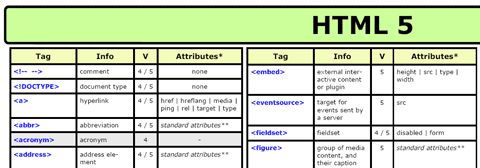
To keep updated with new Internet trends and technologies i have decided to construct Palmhives website using HTML5 and CSS3. As i have never even created a website with this coding is going to make it difficult considering i have to implement it into a CMS aswell :/. So the best place i was told to start would be to look at cheatsheets to try and grasp the tags etc used.

Cheatsheet i found for HTML5 was at....

Smashingmagazine

CMS - Research

To begin understanding the way CMSMS works i have compiled a list of the common tags i will be using for Palmhives website...
{sitename}
- will add the sitename you can set in the Global Settings

{title}
- will be replaced by the title of the content (You can set title when creating content pages).

{stylesheet}
- This must be between the tags. It links all the stylesheets that you have attached to your template. If you forget this your page will appear without styles. If you rather want to use external stylesheets you can add a normal tag in the header.
{metadata}
- will add the meta data you can set in the Global Settings
{content}
- This will be replaced by the real content of the selected page, the content that you edit for each page in Content -> Pages (use {content block='another_content_area'} to add another editable area to the template). Some other info how to add multiple content blocks and modify your template to show block only if it has text.

{content_image}
- This will be replaced with the Image selected in the Edit Page window, at the bottom of the screen with the block name you specify (i.e. MyImage). (use {content_image block='MyImage' dir='images'} for immediate results).

{$content_obj->GetPropertyValue('image')}
- This will be replaced with the image filename selected on the Edit Page screen under Image. (use GetPropertyValue('image')}" /> for immediate results.).

{breadcrumbs}
- Will be replaced by a path to the selected content.

{menu}
- This is one of the most common menus. The entire menu will be automatically generated from your pages, where you put this placeholder. This tag can also take parameters, depending on how you want to display the menu. For example {menu collapse='1'} to collapse the sub items in the menu, so that only the sub items of the current menu item are shown.

Tuesday, 1 March 2011

Client Project - Update 1

Its been over a week since I've done anything with the Palmhive website but i have now got to learn CMS before going ahead with the design of the website. I have found several tutorials using different CMS engines. The two that i am going to look further into are 'CMSMS' and 'Wordpress'. I have chosen these two because they offer easier building of websites from a designers end. This is what i am looking for to make my life easier when it comes to implementing Palmhive website into CMS.
Tutorials:
Lynda - Self-hosting a Wordpress Site
Wordpress 3 Essential Training

Monday, 7 February 2011

Client Project - Tutorials

For my client project i am creating a CMS so Palmhive can manage the website themselves. I have never created a CMS before and have found useful tutorials at (http://www.lynda.com/) which provided me with a course in ' Preparing CMS Web Graphics and Layouts Using Open Source Tools ' and now am trying to grasp the knowledge i need to get started. This has put my project slightly behind schedule but is not going to affect the project finishing time.

Preparing CMS Web Graphics and Layouts Using Open Source Tools

Author: Jen Kramer
Released: 12/16/2009 Duration: 1:40 Level: Intermediate

Monday, 31 January 2011

Client - Photoshoot

For my Client Project i have to get photos of the material (fabric) to go in the gallery of Palmhives website. I had problems with taking the photos due to the quality coming out very poorly (seen below). I have done some research into photography and found the solution would be to get a Light Tent (http://www.stevesphotoshop.co.uk/photo_light_tents_cubes.html) at a cost of £20!!

However, i found a guide on the Internet on making my own tent with a cardboard box and a bit of material. Below is some photos of me building and using it.


Now that I have the cardboard tent, i can take all the photos from lining the camera up and angling the material to get a close and quality photo. Here is the before and after photo...

Thursday, 27 January 2011

Client - Got CMS Installed

Just installed my first CMS alongside WAMP!!!! took me ages, but i can now start playing around with customising templates.

Friday, 14 January 2011

Client Project - CMS

I'm currently in the process of designing my website but with the lack of knowledge in PHP!!! but even more so that Ive never built a CMS! so Ive done some research into CMS and have listed the available options for me to choose from. My only other option is to build the CMS by myself!


CMS Made Simple

CMS Made Simple lives up to its name as being an easy system to install, configure, and use. It doesn't have as many features or as large of a user community as Drupal, WordPress or Joomla, but it's a good option if you want to get something online fast without much of a learning curve.

Drupal

Drupal also powers sites by Warner Bros. Records, Forbes, AOL, Yahoo, and The Onion.

Drupal is fairly easy to use once you get past the initial learning curve. Drupal is easier to customize than many other content management systems because of features like custom content types and the Views module.

Joomla

Joomla is a powerful open-source content management system with a very active user community and many modules that you can add to increase functionality.